In one of my previous blog posts, you may have read that I upgraded an older machine that I had gotten from a previous employer. So far, the extra RAM has proven to be a lot more useful than I had imagined! I’ve been able to offload a bunch of what I was trying to use my M1 Pro Macbook for, and so far it’s been working great!
One of the things I was really wanting to try out with this upgrade was using local LLMs with Ollama. You might have seen some videos online about how models like Gemma 3 or 4 could run on hardware as constrained as a Raspberry Pi. This made me very excited, initially, because with all this additional headroom, I was thinking to myself that this is the perfect time to play around with some local LLMs once again.
Using local LLMs can be extremely beneficial to anyone using them:
- Reducing one’s dependency on paid monthly subscriptions
- Privately hosting your own LLMs and data and not letting cloud-services scrape your data
- Never hitting another token limit
That last one is a big deal: a lot of people want to allow agents to run uninhibited by limits, only being constrained by context window sizes. Whenever you hit a limit, it can be frustrating, regardless if you’re using Anthropic, OpenAI, or any other set of models. For people who are using an agent like Hermes or OpenClaw, hitting a limit could mean your agent hits a wall for several hours.
That last point too is… Unfortunately, not something my 4th Generation Intel i7 machine’s integrated graphics processor can really help me with. Really, none of those bullet points are going to really be addressed for me soon. I’ve got a personal Claude subscription, but what exacerbates this entire situation is that Anthropic has done everything under the sun they could do to prevent agent harnesses like Hermes from using their models. Anthropic’s hostility towards it’s models being used outside of their specific products has made their value really depreciate over time for me…
Until I can get my hands on something like an AMD AI Halo, a DGX Spark, or some other kind of unified memory beast, I probably won’t be able to get through any of those bullets (or Anthropic’s restrictive usage policies) easily. However, there are things I’m starting to learn how to use now that I’m hoping I can take advantage of in a future where I won’t have to sell an arm or leg to afford one of those.
This blog originated from a desire to try out Hermes Agent, the new agent that’s becoming increasingly more popular, and for good reason. It’s an agent that not only performs tasks for you autonomously like one would expect from any agent, but it also creates and refines it’s own skills over time as you continue to use it. It’s a brilliant piece of technology that I’m very excited to continue using!
But without all that sweet sweet VRAM, how exactly have I setup a Hermes Agent? Well, that’s what this blog is all about.
The Constraints
VRAM, o VRAM, where art thou, thy VRAM? Look, I know the answer, I just don’t really like it. The truth is: it’s all in graphics cards and unified memory SOCs that are all continuing to skyrocket in price. How much VRAM do I have? Not nearly enough.
See: I’m not really your typical computer nerd. Many of your other favorite nerds you interact with in your life likely have a gaming PC, or some other kind of higher-end desktop computer. Maybe they joined the PC Master Race a long time ago, and they’ve been working their way through computer upgrades for several years of RTXs, Ti’s, 4090s, 3080s, 9600s, AM4s, AM5s, etc. The cold-hearted reality for me is that I’ve only recently (and I’m talking as in the past month or so) what all those terms actually mean. I use what the companies I work for give me, and occassionally I spend a little more on myself to get a personal device. That’s roughly it.
So no, sadly, I don’t have any desktop computers that I could really use for anything like this. I also don’t have any laptops that have nearly the amount of hardware that I would need to achieve any kind of useable agent context window. Ollama, in particular, which has been one of my preferred means of accessing LLMs locally, recommends having over 48GB of VRAM in order to achieve a 256k context window.
For your own context, in case you aren’t aware of what that means, an LLM’s context window is essentially it’s short-term memory for that conversation. Sonnet 5 and Opus 4.8 are capable of context lengths up to 1 million tokens, and typically Codex context lengths (from what I remember when I used it), are typically around 256k. Whenever your context window is reached, pretty much every model will go through and compact the context down so that it can fit more, if it’s a longer-running session.
But why is having a high context window important? Well, because if your LLM can’t use it’s brain, it gets stuck:
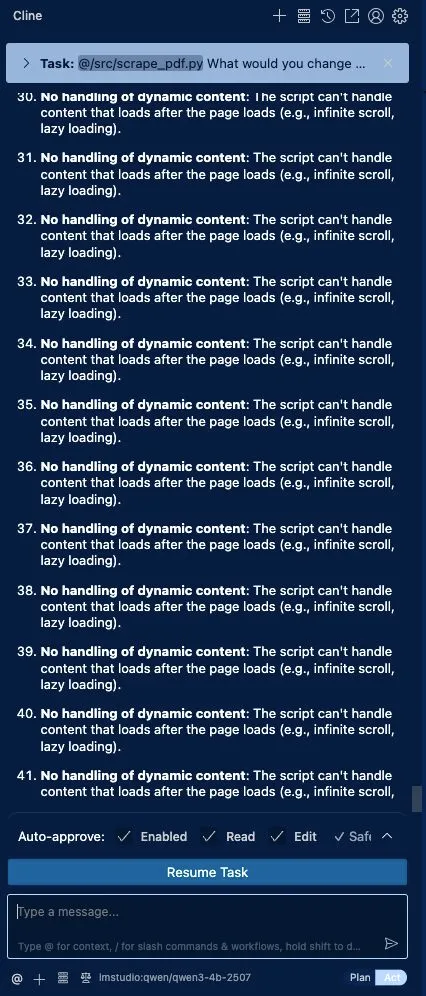
If you opened that link to Ollama previously, you might notice what context windows are recommended depending
on how much VRAM your system has. In the screenshot above, this is Cline running qwen3:4b hosted in LM Studio
locally. The context window in this screenshot was only about 4k. I couldn’t even use Cline with a local LLM
because my local LLM had a real smol brain. The other issue is that between the actual models themselves, which
can take up significant amounts of that VRAM, and the context window your model is storing, your model isn’t
sipping resources at that point: it’s chugging them.
And as it turns out: trying to use DDR3 RAM with a local LLM, even at a larger context window, doesn’t really
yield a usable setup. Was I able to run gemma4:e4b on my W540? Sure, I was able to have one brief conversation
with it. Was I able to use it though? Absolutely not.
But why not? gemma4:e4b was purpose-built to run on constrained hardware at the edge! Well, even if I expand
the context window, I couldn’t prompt the model outside of Ollama. If I tried to hook up Hermes Agent to Ollama
with that model, I couldn’t even get one prompt in before it started timing out. There was just too much context
that Hermes was trying to initialize Gemma4 with, and ultimately I gave up trying to load it locally.
I also knew that Hermes wasn’t going to be able to use my Claude subscription either: everything Anthropic enforces would have forced me to pay for token usage out-of-pocket if I wanted to use the models.
And I’m a cheapskate: I want to pay my $20 per month and use those limits, not pay per token. If I wanted to do pay per token, I would have just started using AWS Bedrock.
I was giving up on the idea of using any local models, and giving up on the idea of experimenting with Hermes until I either switched subscriptions or got a new computer…
But then, I saw this:
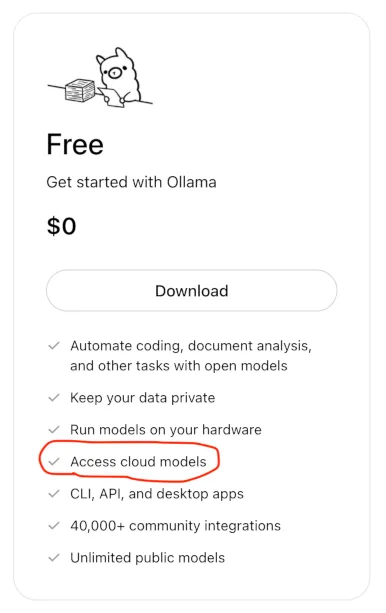
“Access Cloud Models” you say? Usage only reflects the usage of Ollama’s GPU time and not based on token usage, you say? You’ve got models like Gemma4, Qwen3 Coder, and GPT-OSS with 256k context windows, do you?
😏😏😏
Ollama
So let’s start off with the obvious question: why? Why Ollama and why Hermes?
When Lovable, OpenRouter, and many other model providers (some that are arguably better than) Ollama exist, why use Ollama? When graphical tools like LM Studio exist, or potentially more powerful and configurable tools like Llama.cpp exist, why use Ollama?
Because it’s easy for me to use. That’s really the long and short of it. I started my local LLM journey using Ollama, and while I haven’t had the hardware necessary to take full advantage of it a lot of the time, it has a really simple CLI, it’s free to download, only requires an account if you want to use the cloud models, it has most of the popular models you could want, it’s just so darn simple to use. It’s also got config files you can run to customize the behavior of the models if you want to fine-tune some of the model’s default parameters and supply a system prompt to it.
How easy is it to interact with a model with Ollama though if the interface you’re using is primarily CLI-based? Pretty easy. Just download Ollama, and if you want to interact with it, you just login:
ollama signinThen you can pick from a massive swath of cloud-based models hosted
by Ollama. Take gemma4:cloud for example:
ollama run gemma4:cloud
Connecting to 'gemma4:31b' on 'ollama.com' ⚡
>>> say "hello"
Thinking...
The user wants me to say "hello".
The request is straightforward: "say 'hello'".
The appropriate response is to say "hello".
...done thinking.

hello

>>> Send a message (/? for help)
Now… Me personally? I could really do without ever seeing any thinking tokens. Watching the
model generate several paragraphs that all start with But wait, ... seems like a complete waste of
effort and tokens in my opinion. Regardless: you can use Ollama to chat with models pretty easily
this way, and you can choose between a lot of open weight options. You can even create a
Modelfile that allows you to give a model a different name,
provide a system prompt, and override any of the default parameters like temperature and top K.
The only issue here is that the CLI itself isn’t actually very useful. Ollama doesn’t provide any extra tools or harnesses apart from allowing you to chat with the model. To demonstrate this, if you aren’t famous like I am, you can ask it to look up information about you:
>>> Can you search for Jake Varness and tell me what you know about him?
Thinking...
<it thought for a while>
...done thinking.

I was unable to find any widely known public figures, celebrities, or
historical personalities named **Jake Varness**.

It is possible that he is a private individual, a professional in a
specific niche, or someone with a smaller online presence. If you can
provide more context—such as his profession, where he is from, or why he
is notable—I may be able to help you find more specific information.

>>>
You can see here that not only was it apparently never trained on who I was, which tells me exactly how important I actually am, but it also never bothered to actually search the web. This is part of why chatting with a model like this isn’t very reliable: it’s all based on training data within the model. There’s no RAG or tool calls here to help it perform a web search, do deep research, write code for you, etc. It’s about as useful as ChatGPT used to be before they started adding tool calls to LLMs.
In fact: some models out there cannot use tools at all. Fortunately, Ollama allows you to filter by models that can use tools AND are cloud-deployed. Since Ollama is simply providing a chat interface to test out a model, in order to use tools, it needs some kind of agent harness.
An agent harness is something like Codex, Claude, OpenClaw, or Hermes, that is able to use an
underlying model to process your prompts. So while using gemma4:cloud in Ollama won’t allow
you to perform any agentic coding tasks, you could use gemma4:cloud in a harness like Claude
Code, Codex, or OpenCode:
# Claude Code using Ollama
ollama launch claude --model gemma4:cloud

# Codex using Ollama
ollama launch codex --model gemma4:cloud

# OpenCode using Ollama
ollama launch opencode --model gemma4:cloud

# Hermes using Ollama
ollama launch hermes --model gemma4:cloud
That last one is how we can start to take advantage of the power of an always-on agent like Hermes.
Hermes + Ollama
Hermes, like I mentioned before, is an autonomous, always-on agent, that is capable of continuously executing tasks. As you prompt Hermes, it builds skills and memories and can teach itself how to do it’s best possible work for you.
Hermes is also nice in the sense that you don’t necessarily need to use any particular model vendor to use it. Nous Research, the creators of Hermes, do have models specifically designed for Hermes that you could use, but Hermes doesn’t require their models, which is nice. If you have a subscription that isn’t a Claude subscription to a model provider, you could even use an existing subscription!
If you’ve already done some of the steps I’ve done to sign into Ollama, and if you’ve got an afternoon to setup Telegram and Hermes, you can do so by running that last command I mentioned earlier:
ollama launch hermes --model gemma4:cloudApart from the communication gateways, you can also setup different kinds of skills and tools that Hermes can take advantage of! You can go to this tools reference page to check out some of the tools that are installed in Hermes by default and learn about how to browse from a skills marketplace to get new skills and tools.
So with a newfound agent, one would think I’m using it to build a business right? My use-cases unfortunately are not that ambitious at the moment. Like most things in a programmer’s life, to learn how to utilize them best, it’s good to start small and work your way up to more complicated use cases over time. I guess the other good news about this though, is that you can still rest assured that I’m not using AI to write blogs ^-^
However, there was something that I was able to have Hermes do for me that I did think was really cool. I have some compute-heavy workloads for an iOS game I’ve been using Codex and Claude to help me develop over the past few months. Codex and Claude have refined a set of python scripts that I’ve used to develop the levels of the game, and while I’m eternally grateful for their hard work, those scripts take a long time to run, and a lot of memory as well.
Normally, if I wanted to run those on my M1 Pro, my 16gb of RAM doesn’t afford a ton of headroom to actually generate levels. Not only that, but I also have to make the Macbook sit there and run continuously, and if I wanted an update of whether or not a pack of levels got generated, I’d have to go check it myself. All compute and no play makes Jake’s Macbook a dull piece of aluminum.
The upgraded Lenovo was actually a perfect little machine for performing these RAM-heavy tasks, and even though the processor in it is a 12-year-old Intel i7, I don’t really care that it’s going to be able to compute these levels super fast: I just care that it eventually does it.
While running some of these scripts manually myself, and while I was going down this journey of setting up Hermes, I realized something: I might be able to just have Hermes watch these processes for me!
Learning Hermes by Leaning On Hermes
So I told Hermes (and I’m vastly paraphrasing here, it wasn’t the exact prompt): “hey dude, I have 3 python processes running that I’d like to refer to as “level generators”, and I want you to check on them for me 3 times per day and let me know if any of them has completed”.
Hermes basically said: “bet, lemme setup a watchdog”.
And it did! I specified a few times per day to check: times where I thought if something finished that I’d actually be able to do something about it around that time. But I really wanted it to just… Let me know if any of them aren’t running anymore.
What Hermes actually did, was just notify me during each of the times of day and say “hey uh, these are all still running”.
So I had to tell Hermes: “hey dude, I just want you to notify me when one of them actually finishes, and if any of them haven’t, you don’t need to notify me.”
And Hermes was all like: “oooooh ok I get it now” “cronjob: edit” “ok we gucci”
I didn’t hear from it again for a couple weeks. I wasn’t expecting to, really: those scripts take a long time to run. However, to my surprise, while I was out of town and the computer was still up and running and plugging away, I got a notification from Hermes! One of my scripts had ran successfully and generated some levels!
I was pretty excited! I was also excited when a couple hours later it notified me again about the same process that had stopped… And again later that day when it updated me about the same process that it already told me about twice.
So I had to tell Hermes: “hey man, if you see something has stopped running, and you already told me about it, don’t tell me about it again, just let me know when one of the generators is done, and just once.”
And Hermes was all like: “oh sorry about that Jake” “cronjob: edit”
What was really cool about all of this was all the little self-improvement and learning things it does along the way as you prompt it: it picks up on tidbits about you and things that you ask it to do, and it’s always improving as you continue to prompt it.
Now here’s where things got really cool for me: I didn’t want to lose the file the scripts had generated. If I lost it, I’d have to wait weeks potentially for the scripts to generate those levels again. That would be terrible.
But then I remembered: that Lenovo has access to my source control… Which means that Hermes can use the source control too!!
So I told Hermes: “hey bruh, go and commit those new levels to git for me and just push them straight to the main branch.”
And Hermes was all: “oh yea dude I gotchu” as it proceeded to commit files to git for me.
That was the first time in ever that I committed a file to version control without my fingers being physically attached to the keyboard of the computer that the code was all on. Like… I know that one time I had Comet make an empty repo for me, but this felt… very different. I even told Hermes to just commit the new files every time one of those scripts finishes so that I don’t lose them. We’ll see if Hermes actually follows through with that or not 🤣
Heck, I even asked it to start off a new generator and watch that one too! And it was able to!!
Now… Obviously, the stakes are really low with an example like this: I’m making an AI agent monitor processes, commit things to git, and send me an occassional notification or two. Very low-risk. But just think about the possibilities of this: it’s no wonder someone was able to make a social media skill that was entirely made up of OpenClaw agents people owned!
Agents like Hermes are able to perform tasks on a cron schedule, perform tasks on-demand, manage multiple contexts through different sessions, and continuously self-improve. As long as you are able to give Hermes feedback on what it does well and what it could improve on, it can do pretty much anything you want it to!
And to many people reading this who are adopters of AI tools, you might think that this just seems like a different Claude Cowork or Claude Code with Remote Control enabled. But the reality is: it’s simply not. Cowork and Claude Code don’t continuously run and aren’t really capable of monitoring things for you. In fact, one of the first things I tried looking into with Claude and ChatGPT was how I could schedule tasks.
I’m quite positive you can’t do this, or if you can it’s buried, and I don’t think you can use them unless you run the desktop clients.
Even though I’m technically using a cloud-deployed AI model, using something like a Hermes agent through Telegram and Ollama really feels more like it’s my AI and not the AI that a company is giving me a license to use, or the permission to use as long as I continue to use their agent harnesses. It’s also nice to know that I can try out different AI models through Ollama if I wanted to! I hear Meta’s Muse Glimmer is a pretty popular one these days.
Conclusion
These small examples have really shown me the value of Hermes and what it’s capable of. Agents are powerful little pieces of technology that have tons of potential. With clear enough prompts, or at least clearer ones than I was able to provide to Hermes, you can have it efficiently and effectively automate some of our day-to-day routines.
If you are just starting your AI journey, Ollama and Hermes could potentially be a great place to start! With a lower barrier to entry than other tools like Claude Code or Codex, you can explore how to use AI to accomplish your goals, start new projects, or experiment with small ways that you can leverage AI for work!